
One secure AI platform for teams and applications.
Spherium.ai gives people a shared place to work with AI and gives applications a controlled API path to approved models, rules, routing, and reporting.
Start with a 10-Day Free Trial, or request a guided walkthrough for your team.
Secure AI rollout
One platform for teams, applications, and approved models.
Enterprise AI Gateway
AI is spreading through people and applications.
Teams are using AI to move faster. Builders are adding AI into workflows, tools, and applications. But when each team, tool, and app connects to AI separately, organizations lose visibility into access, usage, cost, and risk.
Scattered work
AI conversations, prompts, and context live in isolated tools.
Disconnected apps
Applications connect to models without a shared control layer.
Limited visibility
Leaders struggle to see usage, cost, model activity, and policy events in one place.
How Spherium.ai works
People use Spherium through collaborative workspaces. Applications connect through API access. Both paths apply roles, rules, routing, reporting, and audit logs before approved models respond.
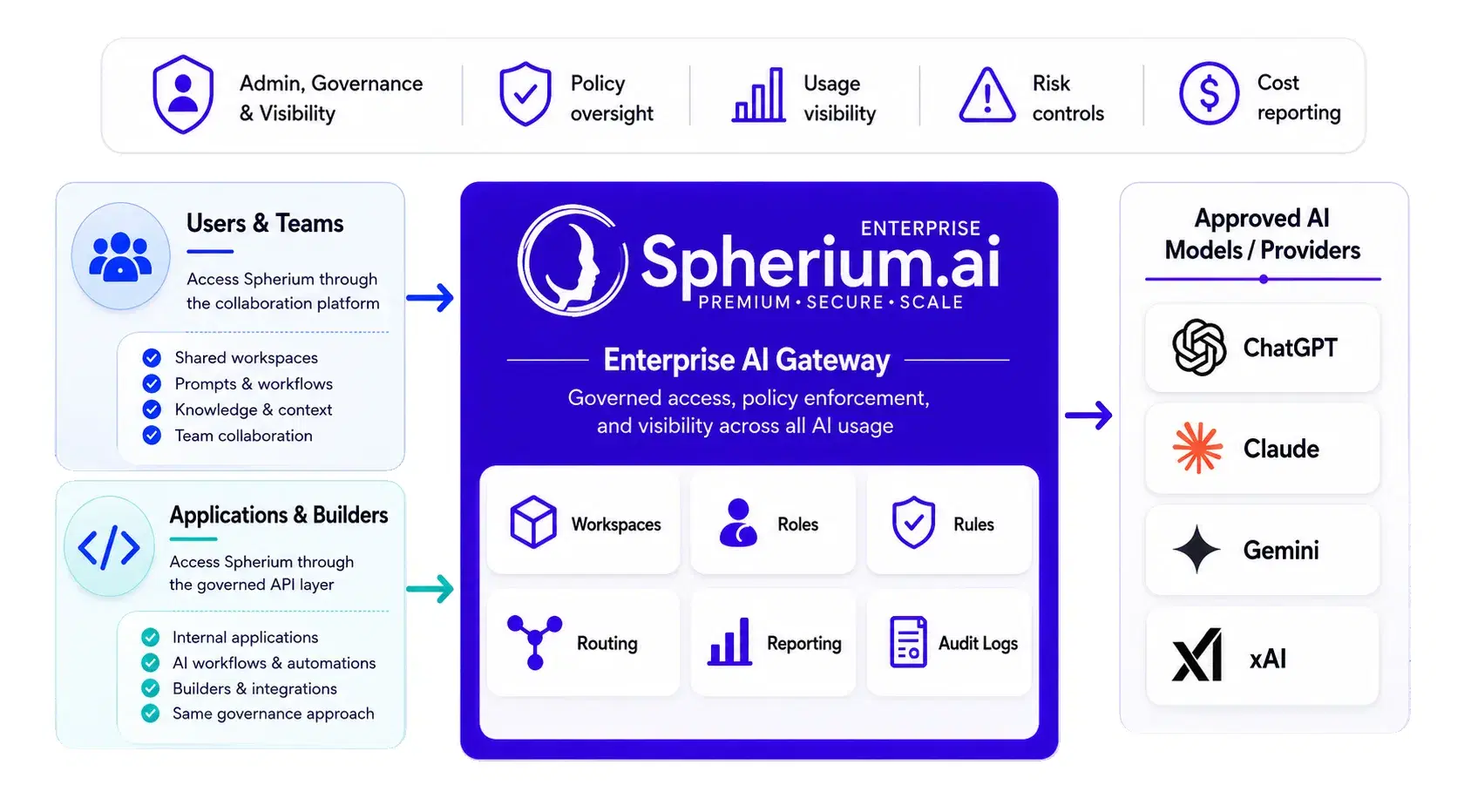
People work in personal and team workspaces. Applications connect through the API. Roles, rules, routing, reporting, and audit logs stay tied to the same approved path to AI models.
Two paths in. One platform.
Give people a shared place to use AI, and give builders a controlled API path for AI-enabled workflows.
People and teams
Teams use Spherium through personal and shared workspaces for prompts, workflows, knowledge, and reusable context.
Applications and builders
Applications use the API layer to connect AI into approved workflows while following the same rules, routing, and reporting approach where supported.
Access, rules, routing, and reporting in one path.
Spherium keeps the core operating pieces connected so teams can use AI and leaders can understand adoption as usage grows.
Workspaces
Keep AI work organized by team, department, project, or use case.
Roles
Control who can access each workspace and what they can do.
Rules
Apply routing rules and governance rules by workspace need.
Routing
Direct AI requests based on workspace needs, cost, performance, or policy where supported.
Reporting
Review usage, adoption, cost, and model activity in one place.
Audit logs
Support evidence-ready review of platform activity and administrative changes.
See the platform in action.
A closer look at how shared workspaces, rules, and Reporting Hub show up inside Spherium.ai.
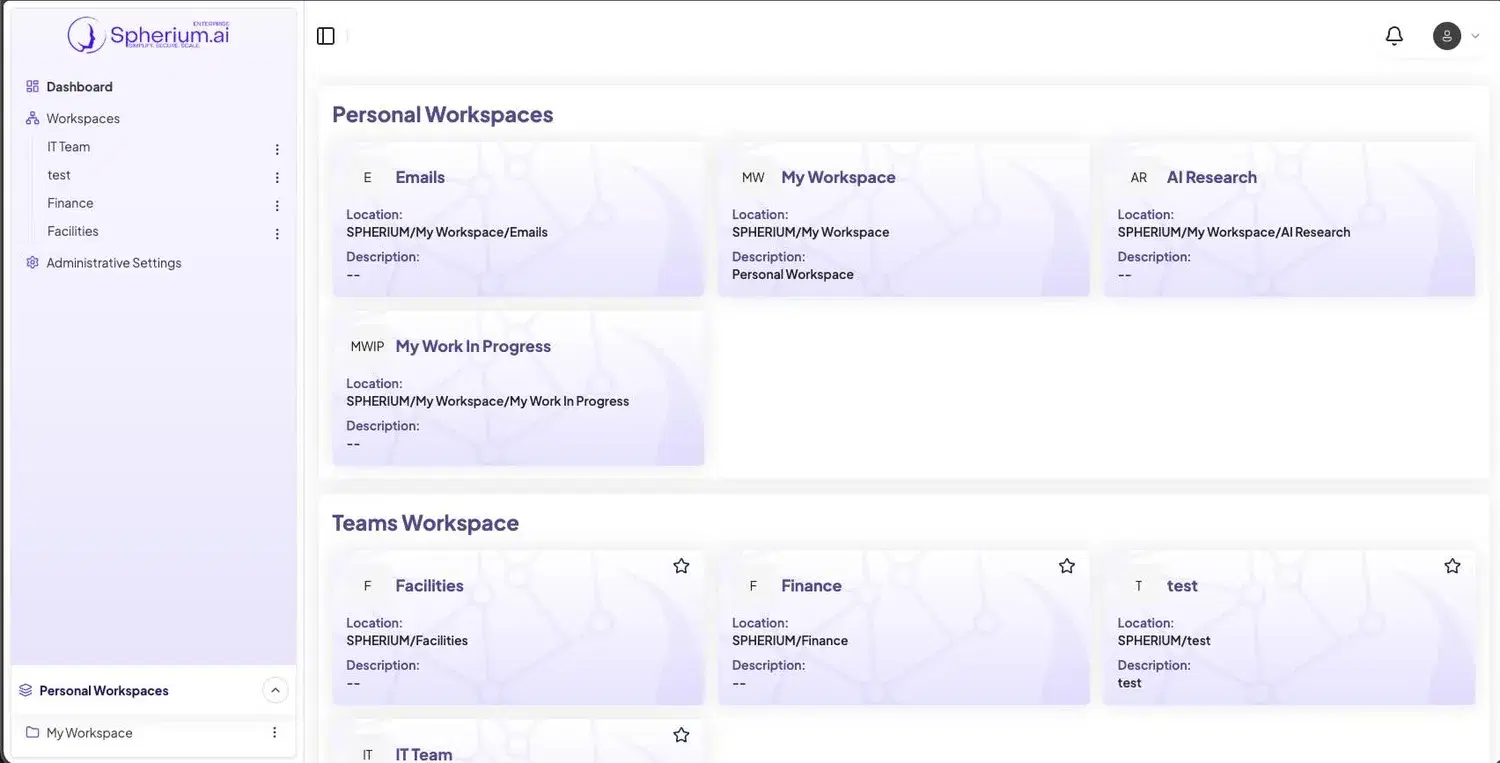
AI work that teams can actually reuse.
Spherium helps teams move beyond one-off AI chats by keeping useful context, prompts, workflows, and knowledge connected to the work.
Reporting that helps leaders guide adoption.
Leaders need to understand where AI is being used, what it costs, and how teams are following approved workspace rules without turning everyday AI work into a bottleneck.
Not another AI chat tool.
AI tools help individuals complete tasks. Spherium helps organizations run AI across people, applications, models, and teams.
Platform questions buyers ask
Straight answers for IT, security, operations, and AI program leaders evaluating Spherium.ai.
What does Spherium.ai do?
Spherium.ai brings users, applications, workspaces, models, rules, routing, and reporting into one secure AI platform.
Is Spherium.ai just another chatbot?
No. The platform includes a collaboration experience for teams, plus an API layer for applications and builders.
How do teams use Spherium.ai?
Teams use shared and personal workspaces to organize prompts, workflows, knowledge, reusable context, and model access.
How do applications connect to Spherium.ai?
Applications can connect through the API layer where enabled, using the same access, rules, routing, and reporting approach where supported.
Does Spherium.ai replace ChatGPT, Claude, Gemini, or xAI?
No. Spherium.ai helps organizations manage access to preferred AI models while keeping the approved path consistent.
How does Spherium.ai help reduce AI sprawl?
It gives teams one place to work with AI instead of scattering prompts, context, reporting, and model access across disconnected tools.
What can leaders see in Spherium.ai?
Leaders can review usage, adoption, cost, model activity, workspace activity, rule events, and audit logs.
Can we start with a free trial?
Yes. Teams can start with a 10-Day Free Trial or request a guided walkthrough before onboarding first users.
Plan your AI rollout
Bring AI into one secure place.
Give teams access to AI while giving leaders visibility into workspaces, usage, rules, routing, and reporting.